Release notes 2026
Written By Wiebe Dijkman
Last updated 24 days ago
🚀 Release notes v222 – 19 October 2026
This release brings four upgrades to Spreadsheet View for Salesbuildr Pioneers, built straight from their feedback, and introduces four customer-visible improvements: an effective date when you add quote items to an existing contract, bulk editing of account managers, company tax settings that match your PSA, and one expiry time for all your quotes. It also includes a broad set of fixes across quotes, products, storefront and PSA synchronization.
🧪 Spreadsheet View — four upgrades from Pioneers feedback
The first Pioneers posts on their feedback board have already turned into new features. Spreadsheet View now shows the full structure of your quote and lets you shape the table to the way you work:
Your own column layout: drag columns into the order you want, save the layout as a named preset and switch presets from the toolbar in one click. Presets are stored with your account, so they follow you to any browser or device
Collapse all sections: see the outline of a large quote in one click. Collapsed sections show their number of products and their total
Drag whole sections: move a section up or down and all its products, add-ons and bundle items move with it. The new order is what your customer sees after you save
Text, summary and other content in place: non-product content such as text, images and the summary now appears as a slim row in its real position, so the table matches your customer's quote and PDF
Spreadsheet View is available to Salesbuildr Pioneers. Want early access to this and future betas? Join the Pioneers at www.salesbuildr.com/pioneers.
📄 Contracts — choose the effective date for new contract items
When you add the items of an approved quote to an existing contract in your PSA, you now choose the Effective date of the new lines. It's prefilled with today. Before, the new lines took over the original start date of the contract, so services sold today could be billed from years ago. This works for Autotask, ConnectWise and HaloPSA. Dates outside the contract period are rejected before anything is sent, and a date in the past shows a warning that your PSA may prorate or reject already-invoiced periods.
What this improves
New services start billing on the right date
No more correcting every contract line in your PSA after the push
Fewer invoice corrections towards your customers
👤 Companies — change the account manager for multiple companies at once
Account manager is now available in the bulk edit of your Companies overview. Select the companies, choose the new account manager and save. The change shows everywhere you filter on account manager, and it reaches Autotask and HaloPSA the same way a single company edit does. On ConnectWise the dialog tells you that the account manager is not updated in your PSA. You can update up to 100 companies at a time.
What this enables
Hand over a full portfolio in minutes when a rep leaves or accounts are reassigned
Keep company, opportunity, quote and contract overviews filtered on the right person
🔗 Companies — tax settings that match your PSA
Companies in Salesbuildr now show the tax setting your PSA uses for quoting. On Autotask, you pick the Tax region when you create a company in Salesbuildr, and that region is sent to Autotask with the new company, so quotes for that client use the right tax from the start. Once Autotask owns the company, the region is shown read-only. Companies imported from Autotask or ConnectWise show the tax setting held in your PSA.
What this improves
New clients in regions with their own tax rate are quoted at the correct rate
No silent fallback to your PSA's default tax region
One place to check a company's tax setting before you send a quote
⏰ Quote expiry — one expiry time for all your quotes
You now set the expiry date of a quote, and the time of day comes from one account-wide setting: Quotes expire at, under Settings → Platform, next to your Account timezone. The default is 23:59, the end of the day. Quotes now expire at exactly that time in your own timezone, wherever you are, and HaloPSA receives the same expiry date you see in Salesbuildr.
What this improves
Quotes expire on the day and at the hour you expect, also outside Europe
Your customers see the same expiry date in the quote, the PDF and your PSA
✨ Other improvements
Opportunity details in quotes: The PSA opportunity ID and link are now available as merge fields in quote content widgets, under the same names as in your email templates:
{{quote.opportunity.externalIdentifier}}and{{quote.opportunity.externalLink}}. They show in the quote and the PDF.Dynamic pricing stays dynamic: Running Synchronize products and services from your PSA no longer overwrites a product's dynamic distributor pricing with a fixed price and cost.
Sync warning before you send: When a quote line hasn't synced to ConnectWise or HaloPSA yet, you now see it on the line itself before you click Send.
🛠️ Stability improvements
Quotes and editor
The default payment term from your template is filled in on new quotes again
New widgets are added at the position you selected
Colours, cover and font are kept when you create a template from a quote
Unlisted Vimeo videos embed correctly in media widgets
Changing the distributor on a quote line suggests that distributor's actual cost
The client approval page no longer shows stray colons on translated fields
Users with a viewer licence can open approved quotes that use a price book
Audit trail
Quote views by your customer are recorded in the audit trail
An internal Mark as sent is no longer shown as sent to the customer
Products and pricing
Pax8 cost and price are shown in your own currency
A deleted category no longer comes back on a product after an Autotask update
Bulk editing HaloPSA service items offers service categories
The procurement warning on ConnectWise products explains when it applies
Storefront
A 0% discount shows the standard sell price instead of a crossed-out duplicate
New contacts are no longer allowed to place storefront orders by default
Companies, users and dashboard
The procurement permission is only shown when procurement is turned on
Contacts synced with Autotask show the Autotask icon in the profiles list
The 12-month one-time revenue total on the dashboard is no longer rounded down
Autotask
When you create an Autotask ticket from an approved quote, one product that can't be added as a charge no longer stops the other products, shipping, note and Quote Link from syncing. Service and labour lines show why they aren't added as ticket charges
Inactive contracts no longer appear on the Contract Expirations view
HaloPSA
Billing period and term of recurring items are set on new HaloPSA sales orders
These changes don't add major new functionality, but they reduce friction and improve day-to-day trust in the platform.
🔭 In progress
Salesbuildr 2.0: We're working on a complete design overhaul of the Salesbuildr interface: a cleaner, more consistent look across the whole platform. More on this in the coming releases.
Quote versioning: Quote edit history, restoring previous versions and clear version updates for your customers.
Quote editing through the Public API: Letting integrations update draft quotes after creation, with final actions staying in your hands.
AI connections (MCP): A secure way for compatible AI tools to find Salesbuildr information and help build quotes, with access controlled by tenant administrators.
Features under development are subject to change. Follow the feedback portal for updates.
View these release notes in the changelog
🚀 Release notes v221 – 28 September 2026
This release launches Spreadsheet View, the first beta for Salesbuildr Pioneers, and introduces four customer-visible improvements: clearer error messages, a new CloudFactory integration, better insight into your templates and widgets, and simpler email settings. It also includes a broad set of fixes across quotes, products, storefront and PSA synchronization.
🧪 Spreadsheet View — now in beta for Salesbuildr Pioneers
Spreadsheet View is the first feature in Salesbuildr Pioneers, our new beta program. It shows every line of a quote in one table you can edit just by typing, with bulk editing, drag-and-drop ordering, import from Excel or CSV, and totals that update as you go. Pioneers can use it on their live quotes today. We'll make it available to everyone once we've processed their feedback. Want early access to this and future betas? Join the Pioneers at www.salesbuildr.com/pioneers.
⚠️ Errors — know exactly what went wrong, and where
Many sync errors start in the connected PSA or distributor. We can't fix those at the source, but we can now tell you exactly what went wrong and where. Salesbuildr's new error engine recognises each error, gives it a unique error code and shows a clear title, a short explanation and the next step. Where possible, you can act straight from the message with Retry, a button that takes you to the right setting, or View help for a step-by-step article.
You see the same wording everywhere the error appears: on the sync card, in the error dialog, on the sync icon of quotes and opportunities, and on the Issues page (Admin → Tools → Issues). Errors that aren't described yet no longer show raw technical output. You get a general message instead, with a Show raw error option when you or our support team need the full detail.
What this means for you over time
Clearer with every release: we keep adding explanations for new types of errors, so more and more of them come with a plain-language cause and next step
Support already has the details: every error is recorded automatically with its context, so when you contact us we can see what happened and where, without back-and-forth to reproduce it
Recurring issues solved for everyone: because errors come together in one place, we spot patterns early and fix them for all customers when the cause is on our side
No waiting on a ticket: common setup issues, like a missing mapping or an expired credential, come with a direct fix
☁️ CloudFactory — connect your Microsoft cloud distributor
You can now connect CloudFactory to Salesbuildr, next to Pax8, RoutIT and your other distributors. Connect your CloudFactory account under Settings → Integrations, then search the CloudFactory catalogue under Products → CloudFactory and link Microsoft products to your own products, with partner and retail prices side by side. Prices of linked Microsoft products are refreshed every night, so your quotes always use current pricing.
You can also link your Salesbuildr companies to your CloudFactory customers. For Autotask users, each linked company's Contracts tab shows its Microsoft subscriptions from CloudFactory, with quantity, term, status and auto-renewal.
What this enables
Quote Microsoft licences from CloudFactory at up-to-date prices
See a customer's current Microsoft subscriptions right next to their company in Salesbuildr
Manage CloudFactory the same way as your other cloud distributors
🧾 Templates and widgets — see what is used, and where
Two new columns help you keep your template and widget library tidy. The templates overview (Quotes → Templates) now shows how many quotes were created with each template in the last 12 months, and you can sort on it. The widgets overview (Quotes → Widgets) shows how many templates each widget is linked to. Hover the number to see the template names and open them directly.
What this enables
Spot unused templates you can clean up or combine
Know which templates change before you edit a shared widget
Keep your sales team working from the templates that matter
📧 Email settings — one place for sender and BCC
Use site's default from address and Default BCC have moved from Settings → Quotes → Configuration to Settings → Email → Settings, next to your other email settings. The BCC address is added to your quote notification emails. Your existing settings have carried over automatically.
The separate notify the quote owner when a quote is sent switch has been removed. You now control this with the CC field of the Notification to customer to request quote approval email template. If you had the switch turned on, we've already added the quote owner to that CC field, so nothing changes for you.
What this improves
All email settings in one place
One clear spot to decide who receives a copy of quote emails
No duplicate settings that could contradict each other
✨ Other improvements
Update PSA credentials yourself: Rotated your PSA password or API secret? Tenant admins can now enter the new secret under Settings → Integrations for Autotask, ConnectWise, HaloPSA and Dynamics, without contacting support. Salesbuildr checks it with your PSA before saving.
Autotask sync recovery: When a quote or opportunity can't sync because its company or contact isn't linked to Autotask yet, Salesbuildr now syncs the company and contact first and tries again automatically. Other sync failures show a clear message about what to fix.
Product images on Marketplace import: When no image is available from the product content providers, the distributor's own image is now used.
Faster HaloPSA product imports: Inventory imports from HaloPSA make fewer calls to your PSA, which reduces rate-limit errors.
New distributors: You can now connect Westcon-Comstor and Rack Power in New Zealand, and Bluelink in the Netherlands, yourself under Settings → Distributors → Connections. The setup steps are shown when you add the connection.
Snappernet part numbers: Snappernet imports now use the distributor's manufacturer part number, so products match more accurately.
🛠️ Stability improvements
Quotes and editor
Profit and margin in the financial summary are now correct on quotes in another currency
The Contract Term Total template setting is now saved correctly
Manual shipping costs are kept when you send a quote
Add-ons are no longer shown as selected when Add to quote is turned off
Widget colours are kept after editing
The same product now shows the same price across quotes and templates
Quotes stay accessible when the opportunity contact moves to another company
The decimal key on a numeric keypad works again in price fields
Copied quotes keep Pax8 service lines as services
Quote PDFs no longer stack the logo, badges and title on top of each other, and spaces in PDF file names are kept
Products and pricing
Pax8 prices show in the product editor again
Deleted labels are now removed from all products
Default product settings, such as serialised and dynamic tax, are applied on Marketplace imports
Creating a product from a quote or the product catalogue works reliably again
The EAN field is now filled in Public API product responses
Storefront
Product add-ons are shown in the company's selected currency
Category product counts match the products shown in the list
The product sorting window loads correctly
Adding products to the cart quickly no longer creates a second basket
Companies, users and dashboard
New companies now default to the Lead type
The margin discount on a company's Admin tab shows the selected value
Logging in to the portal links to an existing contact instead of creating a duplicate
Users on tenants without a PSA can edit their role on their own profile
Sorting works on the whitespace page
Dismiss all on the Issues list works again
Opportunities
Opportunities are set to Lost when the linked quote is declined
Opportunity imports from your PSA no longer clear the contact in Salesbuildr
Autotask
Pax8 Microsoft part numbers now sync to Autotask quotes
Adding an Autotask open contract to a quote works again
Product and shipping charges are sent to the Autotask ticket when the quote also contains labour
ConnectWise
Item-level sync errors no longer block sending a quote in ConnectWise
Opportunities created in ConnectWise sync to Salesbuildr automatically again
Account managers now sync from ConnectWise
Recurring opportunity imports no longer fail on an unmapped category
HaloPSA
Labour add-ons on accepted quotes now sync to the HaloPSA sales order
These changes don't add major new functionality, but they reduce friction and improve day-to-day trust in the platform.
🔭 In progress
Quote versioning: Quote edit history, restoring previous versions and clear version updates for your customers.
Quote editing through the Public API: Letting integrations update draft quotes after creation, with final actions staying in your hands.
AI connections (MCP): A secure way for compatible AI tools to find Salesbuildr information and help build quotes, with access controlled by tenant administrators.
Salesbuildr 2.0: We're working on a complete design overhaul of the Salesbuildr interface. More on this in the coming releases.
Features under development are subject to change. Follow the feedback portal for updates.
View these release notes in the changelog
🚀 Release notes v220 – 9 September 2026
This release introduces two major customer-visible improvements: a streamlined quote template editor and an expanded Public API. It also includes improvements across Marketplace access, quotes, pricing, PSA synchronization, procurement, and distributors.
🧾 Quote templates — settings now live in the side pane
The quote template editor now follows the same layout as the quote editor.
The separate Widgets | Settings tab bar has been removed. A cog icon in the side pane now opens the template's default settings next to the widget controls. Language and localisation settings also live in this tab, providing one place to manage them.
What this improves
A consistent editing experience across quotes and templates
Faster switching between content and settings
No duplicated settings that can conflict with each other
Better access to template settings on smaller screens
🔗 Public API — line pricing, product labels, and better quote lookups
This release expands the Salesbuildr Public API for teams building custom integrations.
Set quote-line pricing: Products in quote-creation requests can include their own cost, price, markup, original price, and term. Omitted values continue to use catalogue pricing.
Resolve product labels: New endpoints return all product labels or one label by ID, including its name and colour.
Read original quote-line prices: Quote responses and webhooks now expose the pre-discount unit price directly.
Find quotes by opportunity: Quote filtering by opportunity now returns the correct linked quotes.
Use relative date filters: Opportunity searches support windows such as "created during the last hour."
Receive the correct supplier: Quote lines now reflect an explicitly selected custom supplier, while RoutIT products expose their configured vendor.
What this enables
Create quotes from external systems using exact line pricing
Synchronize quotes to accounting systems with two-decimal precision
Display product labels consistently in external integrations
Find recently created opportunities and their associated quotes reliably
✨ Other improvements
Read-only Marketplace access: Product Viewers can now browse and search Products → Marketplace without being able to import or edit products. Import buttons, bulk import controls, and selection checkboxes remain restricted to Product Editors.
Cleaner customer dashboard: End customers no longer see Draft and Expired cards on their Storefront dashboard. They only see quote types they can open.
Purchase-order emails: Distributor emails now use "Purchase Order" in their subject and body. Purchase-order dates follow the tenant timezone.
Permission-aware actions: The Create Quote button on an opportunity only appears for users allowed to manage quotes.
Safer impersonation: Log in as this user is disabled until the invited user has completed their first sign-in.
Prospecting module: Contacts display correctly, visitors can be linked to existing companies, and the Ideal Customer Profile can be edited — including competitors. Time on page is shown per visit, and an optional daily digest can be configured.
Recurring jobs: Fixed an issue that could cause recurring jobs to be scheduled multiple times and run repeatedly during the same interval.
Product price history: Price-history entries are now created only when a price actually changes.
Database connection resilience: Background processing for AU-hosted tenants was hardened against silently dropped database connections.
🛠️ Stability improvements
Quotes and editor
Clear filters on the Quotes page once again shows all quotes, while the initial view still defaults to Draft and Waiting approval
Fixed PC bundle prices dropping to cost in customer-facing quote views
Fixed the default shipping type not being applied to new quotes
Removed an incorrect synchronization warning shown while the product itself was valid
Fixed products appearing as Unavailable on quotes while showing stock on the product page
Fixed quotes created from templates showing stale linked-widget content
Improved responsive navigation so the side navigation collapses before squeezing the editor content
Products and pricing
Fixed the product overview showing a different price from the product page
Fixed storefront categories without markup falling back to the tenant default instead of the product's own category markup
Restored the active category name in the product edit dialog for HaloPSA tenants
Fixed an error when enabling variants on a product
Companies and login
Older addresses can now be saved without incorrectly reporting Country is invalid
Users linked to multiple companies can log in when at least one linked company allows login
Autotask
Companies are no longer deactivated in Salesbuildr when Autotask assigns an account number
Distributor information is now populated on Autotask purchase orders
HaloPSA
Retried sales-order synchronization no longer creates duplicate sales orders in HaloPSA
HubSpot
Contacts added in HubSpot now synchronize into Salesbuildr
Distributors and procurement
Ingram Micro procurement orders no longer fail with an unknown error when the connection drops
Check settings for Alloys now reports successful connections correctly
Ingram Micro price files are read from the correct SFTP folder
TD Synnex Canada feeds now support 12-digit category codes
🔭 In progress
Spreadsheet View for Quotes: Bulk actions and live totals for the grid-style line-item editor are in review. Excel/CSV import and paste are in development.
Quote versioning: Design and prototyping now cover quote edit history, single-editor locking, restoring previous states, and customer-visible version updates. Implementation scope is being refined.
Quote editing through the Public API: We're preparing to let integrations update draft quotes after creation, including lines, widgets, pricing, shipping, and quote details. Final actions remain human-controlled.
AI connections (MCP): We're developing a secure way for compatible AI tools to find Salesbuildr information and help build quotes, using access controlled by tenant administrators.
Salesbuildr 2.0: We're working on a complete design overhaul of the Salesbuildr interface. More on this in the coming releases.
Features under development are subject to change. Follow the feedback portal for updates.
View these release notes in the changelog
🚀 Release notes v219 – 17 August 2026
This release puts stability first — with a broad round of fixes across quotes, products, storefront, and PSA sync — with three customer-visible improvements: automatic cleanup of deleted HubSpot companies, duplicating line items in the Items widget editor, and a smoother bulk-import flow in the marketplace.
🔗 HubSpot — deleted companies now stay in sync
Deleted a company in HubSpot? Salesbuildr now notices and hides that company for you too. Before, the company would stay in your Salesbuildr list forever, and you had to remove it by hand. Good to know: this only tidies up Salesbuildr. Nothing is deleted in your PSA — Autotask, ConnectWise, and HaloPSA are left completely alone.
What this means for you
Delete a company in HubSpot and it disappears from Salesbuildr too — no manual cleanup
The company stays hidden and can't come back by accident, because it no longer exists in HubSpot
Changed your mind? Link the company to a HubSpot company that does exist, and it comes right back
🧾 Templates & widgets — duplicate line items with one click
Building quote content just got faster. In the Items widget editor you can now duplicate any product row with a single copy button, instead of adding a fresh row and re-entering the same product, description, and pricing. Ideal for widgets with several similar lines — copy, tweak, done.
What this enables
Build multi-line widgets in a fraction of the time
Keep pricing and descriptions consistent across similar lines
Less repetitive data entry when maintaining your standard building blocks
🛒 Marketplace — refine your selection while bulk importing
When you bulk-import products from the marketplace, you can now remove products from your selection while assigning categories — available in the Select per item assignment mode, and also when importing Marketplace products from a quote. Spotted something that doesn't belong halfway through? Just drop it from the list and continue — no need to cancel and start the import over.
What this improves
Fix selection mistakes without restarting the whole import
Cleaner catalogs, because it's easier to leave out the incorrect items
A faster, more forgiving bulk-import flow
🛠️ Under the hood
This release also includes smaller refinements you'll notice day to day:
Clearer quote acceptance for your customers — customers reviewing a pending quote now see a panel titled "Review & accept quote", accepted or declined quotes show "Status - Accepted" or "Status - Declined", and internal users keep the "Quote actions" label — so every audience sees wording that fits their context
Consistent "Required" wording — product add-ons and form-widget fields now use "Required" everywhere, replacing the mix of "Mandatory" and "Required" labels
Refreshed social branding — the Twitter logo has been updated to X across the platform
🛠️ Stability improvements
An extensive round of fixes shipped across the platform this cycle:
Quotes & editor — fixed crashes when opening certain quotes, the send-quote dialog showing an empty email editor, add-ons not configurable on one-time bundles, add-ons appearing in a random order when a template is used, template labels missing from the "Select quote template" pop-up, customers unable to collapse a bundle set to "expanded by default", mandatory form fields giving no visible validation hint after pressing Send, the approval email link pointing to a wrong host, and localization now correctly applies to the T&C heading, the Est. Delivery and contract-duration labels, and Australian address formats. The Quotes overview also returns to its Draft and Waiting approval default after clearing filters, and the product-links setting is now phrased positively as Enable product links for customers (existing behavior preserved)
Templates — newly added products to a quote template now use their "Description in quote", falling back to the short description when it's empty, and the template line-item field has been renamed to match where the text appears
Products & pricing — fixed the product edit dialog crashing on certain products, errors when adding specific products as add-ons, product names missing from the overview, the list view applying a different price than the product itself, prices inflated by a currency mis-tag on Bluechip NZ feeds, distributor prices not displaying, category changes via import not reflecting, product availability not inheriting the category's "Hide availability" setting, the "Stock: not found" filter returning the wrong products, and MPN search now prioritizes exact matches
Storefront — re-arranging your storefront no longer scrambles the order, the bulk-edit screen now includes storefront categories, the footer-logo size slider works again, and several migration issues (missing category images, broken links, missing markup) were resolved
Autotask — fixed opportunity pulls skipping imports when a company or contact was missing, the opportunity stage not moving to Proposal Signed after quote approval, quote sync failing on a number format, product imports leaving items half-visible, option-group items bypassing the initial sync, and closed-opportunity revenue showing €0
ConnectWise — fixed product sync failing when a category mapping broke (admins can now see and fix the broken mapping), contact sync failing on email communication types, duplicate companies in the overview, and "Cannot mark quote as primary" errors
Halo — the account manager, company state, and primary-company address now sync correctly, contract imports pull the client-specific contracted price instead of the list price, and product descriptions keep their rich-text formatting after saving
Opportunities & platform — the
opportunity.status_changedwebhook now fires on indirect status changes, dashboard counters no longer include deleted opportunities, the company activity log shows who created or updated a record, the Settings save button stays responsive, filter logic is consistent across list views, sync errors now name the exact items that failed, and company social settings now accept x.com profile URLsPSA setup — a failed integration setup is now clearly marked as incomplete: it shows which step failed and lets you retry, instead of behaving as if setup had succeeded
Public API — the
costCenterfield on the product endpoint now returns real values, the supplier field is populated on distributor-synced quote items, and the HaloPSA and ConnectWise integration keys are available againProcurement & onboarding — the shipping address correctly reverts to the company address when dropshipping is turned off, and new tenants no longer start with a wrong default payment term on their template
These changes don't add major new functionality, but they reduce friction and improve day-to-day trust in the platform.
🔭 In progress
Spreadsheet View for Quotes — the fast, grid-style line-item editor continues to take shape: the core grid and the first version of inline editing are in place, while adding products in the grid and the surrounding save workflows are still in development and review
Error Registry — clearer, actionable in-app error messages with a central place to track recurring issues; the system is running silently on production and go-live preparations are underway
Quote Approvals V1 — the full rework continues, with the refined approval flow moving into build
Design refresh — we've kicked off a platform-wide design overhaul to modernize the Salesbuildr interface; expect a cleaner, more consistent look rolling out gradually over the coming releases
Features are subject to change — follow along in the feedback portal for updates.
View these release notes in the changelog
🚀 Release notes v218 – 20 July 2026
This release focuses heavily on stability — with an extensive round of fixes across quotes, sync, distributors, and the marketplace — alongside one customer-visible improvement: broader catalog control through the public API.
🔗 Public API — manage labels and setup pricing programmatically
The public API gains more complete catalog control. You can now create product labels that actually persist and assign or remove labels on products through the API — previously labels could only be read. We've also made setup cost and setup price writable on the product endpoint (PUT /public-api/product/{id}), matching how the regular cost and price fields already behave.
What this enables
Programmatic catalog clean-up — for example, flagging products that need attention during onboarding with a label instead of clicking through each one
External catalog management tools can now round-trip setup pricing instead of falling back to manual edits
More complete read/write parity for teams building on top of Salesbuildr
🛠️ Under the hood
This release also includes platform work you'll notice in day-to-day reliability:
Bulk email sending now runs in a background queue — sending to hundreds of contacts no longer risks timeouts, and failed sends are retried. Duplicate recipients within a single batch are removed, though re-submitting the same send can still resend to those contacts.
Marketplace and Distributor Hub search hardened — broad searches no longer time out, and new index maintenance keeps search fast as catalogs grow
🛠️ Stability improvements
This release puts a heavy focus on reliability, with fixes spanning quotes, sync, distributors, storefront, procurement, and more:
Quotes & editor — fixed product quantities reverting after saving, deleted payment terms still being applied, a $0.00 setup price showing on the presentation view, the financial summary showing 0,- on the All Quotes overview, quotes failing to send when a product had no category, the share link missing from the finished-quote header, the download button not visible on mobile Chrome, crashes when opening quotes or adding text widgets, expiry notifications defaulting to a date in the past, the term variable rendering in Dutch on English quotes, the zero-quantity removal popup skipping mandatory items, and draft quotes on a closed opportunity becoming impossible to open or close
Templates & widgets — widget edits no longer silently fail to save, formatting is preserved when adding a widget to a template or quote, widget text edits survive switching languages, label changes save reliably, and overly large attachments now get a clear error instead of a generic one
Approvals & notifications — fixed approval rule toggles showing an incorrect off state, declined-quote notifications going to the approver instead of the quote owner, expiry reminders reaching customers while a quote was still pending internal approval, quote creators getting "Access Forbidden" on their own approved quote, end customers unable to e-sign due to an authorization error, and a mandatory IBAN field that could be skipped on acceptance
Autotask — restored automatic opportunity sync, fixed the "Use Revenue/Cost of Quoted Items" flag not being sent on quote approval, service price updates not syncing to Salesbuildr, long company addresses being rejected on quote push, a duplicate EUR 0 one-time charge from setup fees, and intermittent webhook signature errors
ConnectWise — primary-contact changes now carry through to new quotes, product categories map to their real CW names instead of single letters, ticket notes with MPN and cost data sync correctly after quote-to-ticket conversion, and approved quotes update their status reliably
Halo — resolved connection and sync errors, missing Halo price/cost no longer overwrites manually set Salesbuildr pricing with 0, adding items to contracts works again, sales probabilities and opportunity start dates now sync correctly, sales-order titles fall back to the linked opportunity or quote title when left blank, and large imports no longer exhaust system capacity
Products, pricing & search — fixed products being blocked from pricing books after an update, custom distributor prices missing from search results, "Fetch info" returning access errors and clearing tax values, product search failing on special characters, the price-recency filter checking the wrong timestamp, and distributor auto-selection ignoring price thresholds and stock availability
Distributors & marketplace — resolved marketplace data not loading, a ScanSource USD/CAD currency mix-up, ignored internal stock still being used in price calculations, temporary feed and connection settings not saving, an unhelpful RoutIT connection error, and the "Import Products" button doing nothing on quotes
Storefront — bundle items no longer show an empty grid, the cart icon is visible for first-time visitors, only a subset of products showing in a category is fixed, and storefront settings no longer leak when the feature is disabled
Procurement & orders — fixed purchase-order submission failures to TD Synnex, aligned Salesbuildr's temporary PO numbers with the PSA-generated ones to avoid confusion, and companies can now clear a default delivery address and fall back to the primary company address
Opportunities & platform — opportunities now close correctly when their primary quote is approved, UDF fields are editable right after creating an opportunity, public API server-to-server authentication now works for requests without an Origin header and returns machine-readable 403 reason codes, duplicate line items no longer sync to Dynamics Business Central, and HubSpot sync attempts stop once the integration is disabled
These changes don't add major new functionality, but they reduce friction and improve day-to-day trust in the platform.
🔭 In progress
Spreadsheet View for Quotes — the fast, grid-style line-item editor continues to take shape; the core table and architecture are in place and inline editing and bulk actions are actively being built
Error Registry — clearer, actionable in-app error messages with a "View help" link and a central place to track recurring issues; the foundations are live and the customer-facing messaging is on the way
Quote Approvals V1 — the full rework continues with approval status visibility, a preview of the approval flow, and a richer multi-approver experience
Features are subject to change — follow along in the feedback portal for updates.
View these release notes in the changelog
🚀 Release notes v217 – 30 June 2026
This release introduces 6 customer-visible features — faster widget handling, clearer quote approvals, deeper Halo support, account-manager filtering across overviews, a cleaner multi-currency editor, and a stronger public API — plus a heavy round of performance, sync, and stability fixes.
🧩 Widgets — quicker to create, reuse, and insert
Working with widgets in quotes and templates is now much faster across the board. You can:
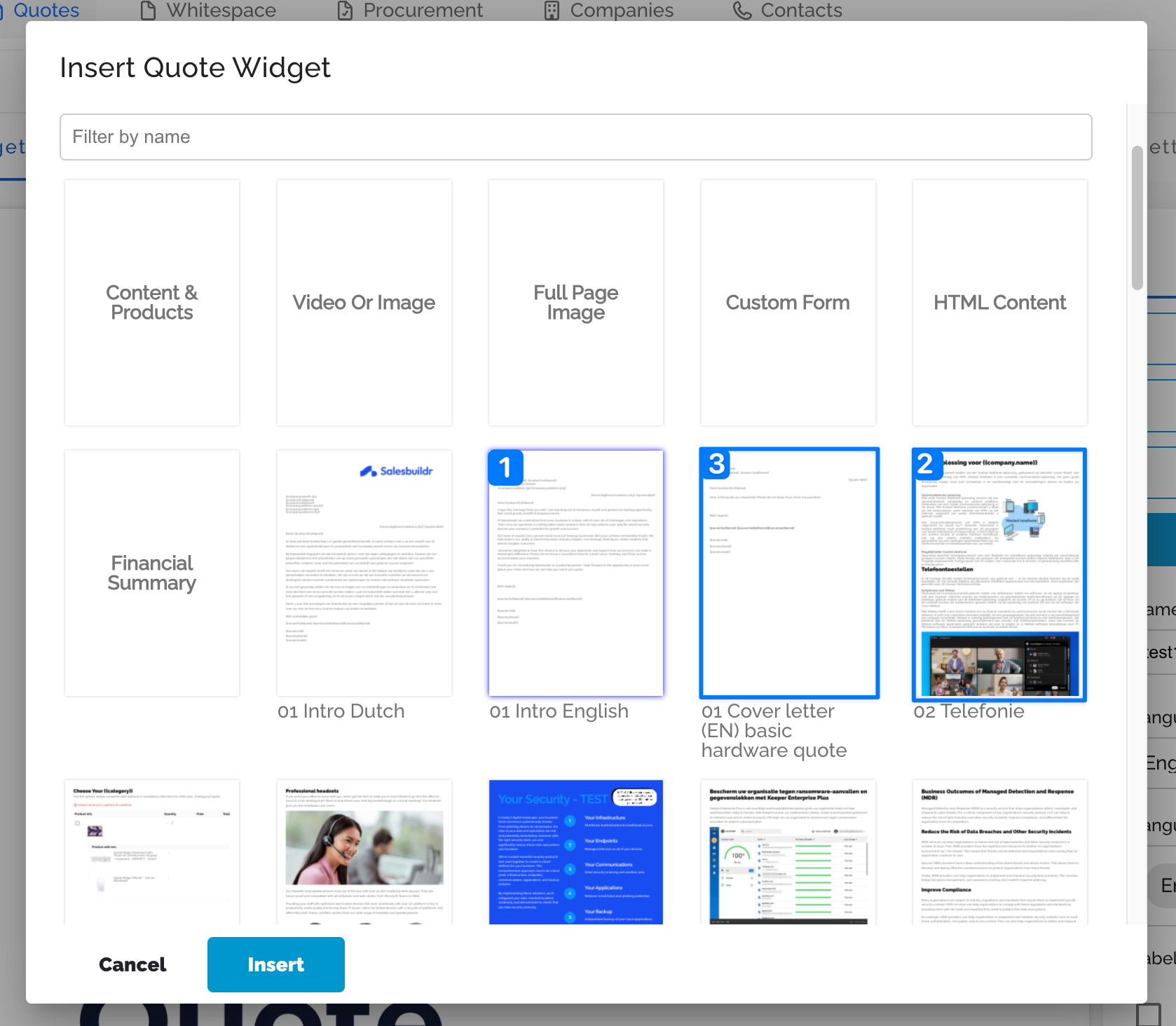
Add multiple widgets at once - select several widgets at once and insert them in a single action (in the order you pick them).
**Add a single widget **- double-clicking a single widget inserts it immediately — no separate save step.
When you save a widget as a template, Salesbuildr now automatically links it back to the source so it stays in sync, pre-fills the template name with the widget's title, and keeps the language you were already working in.
What this improves
Build quotes and templates faster — bulk-insert instead of one widget at a time
Saving a reusable widget is now a single, predictable step that keeps everything linked
No more re-typing names or losing the language on a freshly saved widget
🔐 Quote Approvals — a clearer rule overview
Building on the sequential approval rules from v215, we've reworked the approval rules overview in Settings: rules now show as numbered steps with condition chips and approver pills, so the execution order and who signs off on what is clear at a glance — without expanding each rule. Internal-approval notifications are also more reliable now, so the quote owner is told the moment their quote is internally approved and ready to send.
What this improves
Order rules - critical with sequential processing — is visible immediately
Fewer misconfigured rules, because conditions and approvers are shown up front
Quote owners get a dependable heads-up the moment an approved quote is ready to go out
🔗 Halo — parent/child company hierarchy
Halo customers with parent/child company structures — school boards and their individual schools, holding companies and subsidiaries, franchises — now have that hierarchy imported and kept in sync in Salesbuildr. Parent companies are imported first, then child companies are linked beneath them.
What this enables
See and filter by parent company, and view parent contracts from a child company
Full use of Salesbuildr's existing parent/child features for Halo tenants
No more flattened, context-less company lists for grouped account structures
📋 Opportunities & Quotes — filter by account manager
The opportunity and quote overviews now have an Account Manager filter, matching the one that already exists in the company overview. Until now those views only offered an "Owner" filter — the Salesbuildr user who created the record. Account Manager and Quote Owner (quote creator) can now be filtered separately.
What this enables
Sales teams can see only the opportunities and quotes for their accounts
Consistent filtering across company, opportunity, and quote overviews
🧾 Multi-currency — a cleaner internal quote editor
When you quote in an alternate currency, the MSP-facing editor used to show both the alternate and your default currency side by side, which was confusing and led to discounts being applied against the wrong currency. The internal editor now shows only the currency you're actively quoting in. The customer-facing quote is unchanged. We've also added Currency to the company bulk-edit options, so you can set or correct it across many companies at once instead of one at a time.
What this improves
No more discount errors from mixing up which currency a value is in
A clearer, less cluttered editor for multi-currency tenants
Faster onboarding and clean-up when setting currency across large company lists
🔗 Public API — new opportunity and widget endpoints
The public API gains several requested endpoints. You can now create opportunities and look them up by your own external identifier (GET /public-api/opportunity/ext/{externalIdentifier}), as well as set an external identifier on an existing record. We've also added a DELETE endpoint for quote widget templates, so integrations can clean up duplicate or obsolete widgets programmatically instead of leaving them to accumulate.
What this enables
Sync opportunities both ways using your external system's IDs — no client-side filtering
Automated housekeeping of large widget libraries via the API
More complete coverage for teams building on top of Salesbuildr
🛠️ Under the hood
This release also includes meaningful performance and platform work:
Product search is faster and more reliable — and now also matches on category names, so results are more complete
Pax8 pricing in the quote variant picker is near-instant — reduced from ~3.4 seconds to ~250 ms by reading stored prices instead of live API calls
Ingram Micro hourly stock files are now processed, so tenants on the hourly feed get more frequent stock updates
More efficient Autotask inventory and opportunity imports, plus per-tenant webhook isolation for safer, more reliable sync
A security hardening pass — ConnectWise private keys are now masked in the admin configuration view
The PSA Synchronize tab now explains what each sync option does — and points you to the Products tab to sync your catalogue
🛠️ Stability improvements
Quotes & editor — fixed bundle products showing $0 cost/sell, a multi-year service license missing from totals, a 1-cent rounding mismatch on monthly totals, a missing setup fee on customer-facing line items, quotes occasionally failing to open, expired quotes wrongly flipping to Declined, and several send-dialog and "configure defaults" link issues
Halo — resolved adding items to contracts, a circular company/contact sync dependency, quotes blocked as "unsynchronized" despite valid IDs, repeated session logouts, rich-text being stripped on opportunity write-back, and an incorrect "set category" prompt
Autotask & ConnectWise — fixed billing-code and custom-field persistence and webhook signature errors on Autotask, and discount sync, ticket subtype validation, quote status updates, and primary-contact changes on ConnectWise
Distributors & marketplace — resolved stalled feeds (Ingram Micro, Travion), a Jarltech stock lag, ScanSource price/inventory gaps, distributor-switch pricing and preferred-distributor fallback, and several marketplace crashes and list/detail availability mismatches
Search — accented characters and company names with trailing periods now return the right results, and newly imported Pax8 products are searchable without a manual refresh
Storefront — fixed swapped left/right image alignment, settings leaking when the storefront flag is off, and oversized product thumbnails
Email & notifications — approval-request and access-request emails now point to the right place, and public comments on an unpublished quote no longer trigger customer emails
Procurement & API — fixed purchase-order submission failures, a D&H USD/CAD currency mix-up, and an empty taxes array on the product public API for dynamic-tax products
These changes don't add major new functionality, but they reduce friction and improve day-to-day trust in the platform.
🔭 In progress
Spreadsheet View for Quotes — the fast, grid-style line-item editor continues to take shape; the core table and architecture are in place and inline editing and bulk actions are actively being built
Error Registry — clearer, actionable in-app error messages with a "View help" link and a central place to track recurring issues; the foundations are live and the customer-facing messaging is on the way
Quote Approvals V1 — the full rework continues with approval status visibility, a preview of the approval flow, and a richer multi-approver experience
Halo custom fields (UDF) — import, mapping, and sync of Halo user-defined fields
Features are subject to change — follow along in the feedback portal for updates.
View these release notes in the changelog
🚀 Release notes v216 – 9 June 2026
This release introduces 4 customer-visible features focused on finding quotes faster, clearer distributor data, richer product exports, and approval visibility — plus two new distributor connections and a heavy round of sync and stability fixes.
🔎 Quotes — Quicksearch by quote number, ID & PO number
The global quicksearch would previously only match company and contact names. You can now type a quote number, quote ID, or PO number straight into the search bar and jump to the matching quote in a single action — no more opening the quote overview and filtering to track one down.
What this enables
Find any quote instantly by its quote number or your customer's PO reference
One action vs navigate-then-filter — a real time-saver at high quote volumes
Works alongside the existing company and contact search
🔔 Quote Approvals — get notified when your quote is internally approved
When you send a quote for internal approval, Salesbuildr now **emails the quote owner the moment the quote is approved internally. **Internal approval triggers the quote to be sent directly to the customer. The email notification you receive provides instant feedback to the internal approval process.
What this improves
Know instantly when an internally-approved quote is sent to the customer
No more checking the quote status repeatedly after requesting approval
Works hand-in-hand with the sequential approval rules
🧭 Distributors — "Last checked" timestamps
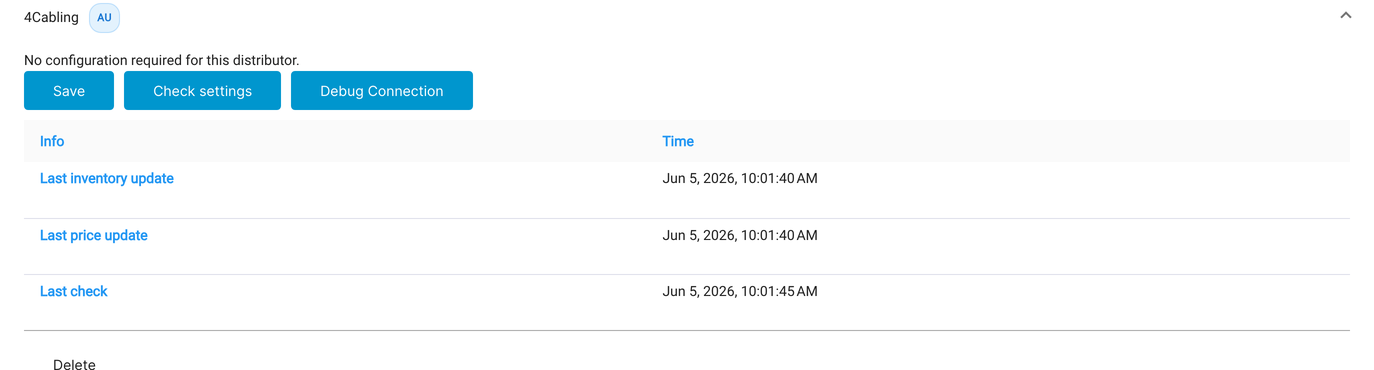
Salesbuildr checks your distributors for price and stock updates approximately every hour. Each distributor refreshes its own feed on its own schedule — some daily, some only weekly. That sometimes made prices or stock look out of date even when everything was working. Distributor data now shows "last inventory update", "last price update" and "last check" timestamps so you can see at a glance how fresh it is.
What this improves
Clear visibility into how fresh distributor pricing and stock really are
Fewer "is this price still current?" moments — the timestamp answers it
More trust in the distributor data you quote from
📦 Products — Setup price & cost in the Excel export
The product Excel export now includes "Setup Price" and "Setup Cost" columns (placed after MSRP), so every pricing field you can see in the product detail screen is also available in the export. Especially handy for KPN/RoutIT catalogues and for bulk data verification or ERP reconciliation.
What this enables
Audit and reconcile setup pricing in bulk without opening each product
A complete pricing picture in a single exported file
Empty cells for products without a setup price, so the data stays clean
🛒 Distributors — Kosatec (EU) and Concerto (CH) now available
Two new distributor connections are live:
Kosatec — available in the EU
Concerto — available in Switzerland (CH)
Find them under Settings → Distributors → Connections → Add Connection.
🛠️ Under the hood
Quote approval rules — condition labels in Settings are now prefixed with "Quote" (e.g. "Quote above value"), so it is always clear what each rule is measuring.
🛠️ Stability improvements
Quote & PSA sync — resolved quote-sync failures and a circular company/contact sync issue on Halo, invalid billing-code and "price required" rejections on Autotask (including Pax8 services), missing products on post-sale tickets, unreliable Autotask contract sync, and discounts not syncing on ConnectWise
Distributors & procurement — resolved a stalled inventory feed and a connection-credentials error for some distributors, and fixed purchase-order currency showing incorrectly for US accounts
Quotes & tax — the default VAT / sales-tax rate is now correctly applied to quotes, plus fixes to delivery-address selection and a quote-list settings link
Email — pasted images in signature footers are no longer stripped, and quote-email template variables (recipient, account manager) now populate correctly
Setup — quick setup no longer fails when no product categories have been imported yet
These changes don't add major new functionality, but they reduce friction and improve day-to-day trust in the platform.
🔭 In progress
Quote Approvals — full rework — Status visibility, approval audit trail, and richer multi-approver workflows on top of the sequential rule processing shipped this release.
Spreadsheet View for Quotes — UX designs for both the line items grid and the import wizard are finalized; engineering is now picking up implementation.
Previously quoted prices — See what you previously quoted a customer for the same product.
Error Registry — clearer, actionable in-app error messages with a "View help" link, plus a central place to track recurring issues. Foundations landed this release; the full experience is on the way.
Features are subject to change — follow along in the feedback portal for updates.
View these release notes in the changelog
🚀 Release notes v215 – 19 May 2026
This release introduces 5 customer-visible features focused on the quote review experience, Halo PSA depth, multi-approver workflows, and catalogue quality — plus four new distributor connections.
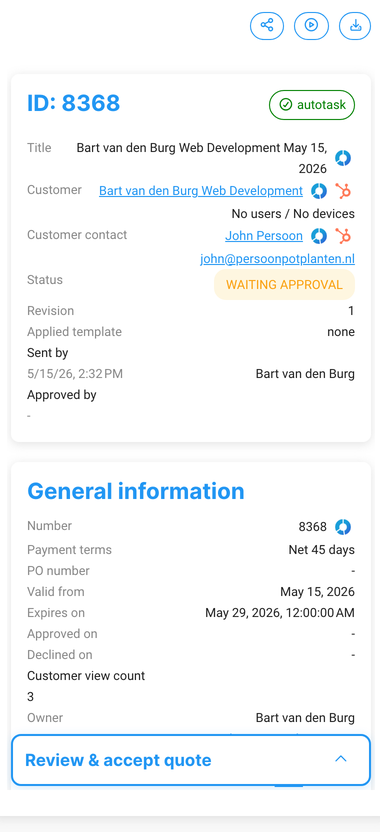
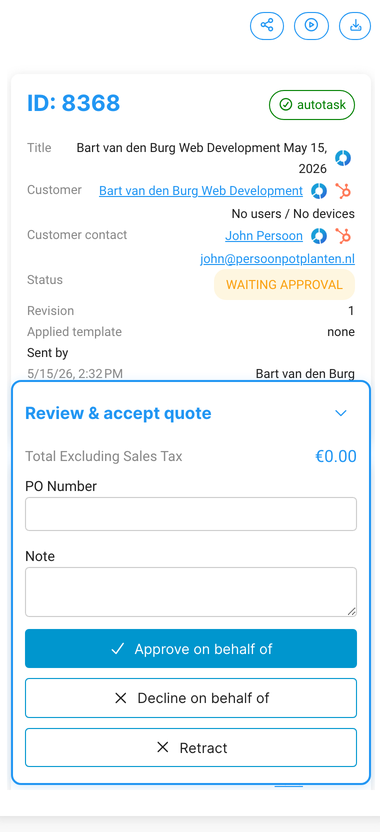
🧾 Quotes — Collapsible "Review & accept" panel
We've reworked the "Review & accept quote" panel in the quote details sidebar so it no longer blocks your view of the quote content. The panel is now a sticky, collapsible bar — collapsed by default so your content is visible, and expandable with one click when you're ready to act.
What this improves
Full quote content visible while reviewing — no more acceptance form covering the screen
Collapse it to review, expand it when you're ready to act — one click, stays where you left it
Cleaner review experience for both team approvals and customer-facing walkthroughs
All existing acceptance functionality (signature, terms, accept button) works exactly as before.
🔐 Quote Approvals — Sequential multi-rule approval
When a quote triggers multiple approval rules, those rules are now processed in order — the first approver signs off before the next one even sees it.


How it works in practice
"All rules in order" — rule 1 approves → rule 2 approves → rule 3 approves → quote goes to the customer.
"Same approver on multiple rules" — Salesbuildr skips duplicates, so the same person isn't asked to approve twice.
"Single rule triggered" — behaves exactly as today; one approver, one email, one approval.
Where to find it: Settings → Quotes → Approval rules — drag ≡ to reorder. Enable "When this rule is met, stop processing other rules" to create conditional chains.
What this improves
Approval rules now match how your team actually works — layered, not parallel
Quotes can no longer skip required approvers when multiple rules apply
Less back-and-forth chasing approvals out of sequence
📦 Catalogue — Products from unlisted manufacturers excluded from quotes
When you unlist or delete a manufacturer, products from that manufacturer are now automatically excluded from the product catalogue search and the marketplace. If you use bulk-add on an opportunity, Salesbuildr shows a warning and skips those products automatically.
What this improves
No more accidentally quoting a product whose brand you no longer carry
Unlisting a manufacturer immediately removes its products from the quoting surface
Bulk-add flows warn you instead of silently including discontinued products
Where to find it: Settings → Products → Manufacturers
🔗 HaloPSA — Quote acceptance note synced back to Halo
When a customer accepts a quote and leaves a note during acceptance, that note is now automatically written back to the linked Halo quotation record. Previously the note was recorded in Salesbuildr but lost in Halo.
What this improves
Acceptance notes from customers are visible in Halo without manual copy-paste
Better traceability — Halo records show exactly what the customer agreed to
Fewer gaps in the audit trail between Salesbuildr and HaloPSA
Automatic for all Halo tenants with quote sync enabled. No configuration required.
🔗 HaloPSA — Optional start date on opportunities
The start date field when creating or editing a Halo opportunity is now optional. Previously, leaving it blank caused sync errors or validation failures.
What this improves
No more forced workarounds when the start date isn't known yet
Importing Halo opportunities with blank start dates no longer fails
Consistent behavior between the Salesbuildr dialog and Halo's own data model
Where to find it: Opportunities → Create new opportunity — "Start date" now shows "Choose a date" and can be left empty.
🛒 Distributors — ALSO (CH), DuxTel (AU), Xit Distribution (AU), and Sektor (NZ) now available
Four new distributor connections are live:
ALSO (CH) — Switzerland
DuxTel (AU) — Australia
Xit Distribution (AU) — Australia
Sektor (NZ) — New Zealand
Settings → Distributors → Connections → click Add Connection.
🛠️ Under the hood
Quotes — the "add items to contract" button has moved next to "create ticket" on won quotes with services, making the post-sale flow easier to find
Quote expiry — quotes now expire at the correct local time for tenants outside UTC
These changes don't add major new functionality, but they reduce friction and improve day-to-day trust in the platform.
🛠️ Stability improvements
Improved sync stability for Autotask, ConnectWise, Halo, HubSpot, and Pax8 integrations
Resolved multiple quote editor issues including post-send editing behaviour and pricing calculations
Improved distributor connection and product pricing reliability across Ingram Micro, A&C, Pax8, and RoutIT
Resolved procurement, product catalogue, and user display issues
These changes don't add major new functionality, but they reduce friction and improve day-to-day trust in the platform.
🔭 In progress
Quote Approvals — full rework — Status visibility, approval audit trail, and richer multi-approver workflows on top of the sequential rule processing shipped this release.
Spreadsheet View for Quotes — UX designs for both the line items grid and the import wizard are finalized; engineering is now picking up implementation.
Previous quoted prices — See what you previously quoted a customer for the same product.
Quote search — Find quotes faster by quote number, ID, or PO number.
Features are subject to change — follow along in the feedback portal for updates.
View these release notes in the changelog
🚀 Release notes v214 – 14 April 2026
This release introduces 3 customer-visible features focused on quote flexibility, PSA sync behavior, and quote performance.
🧾 Quotes – show MPN on customer-facing quotes
You can now display the Manufacturer Part Number (MPN) on quotes your customers see. Several MSPs — particularly in the US — need MPNs visible on proposals to meet contractual margin-audit requirements. When enabled, the MPN appears inline below the product name on both PDF and web quote views.
Where to find it
Global default: go to Settings → Quote → Configuration and enable Show MPN on customer-facing quotes. Off by default.
Per-quote override: open any quote, go to Quote Settings — you'll see the MPN toggle reflecting the global default. Switch it on or off for that specific quote.
How it works in practice
"We show it for all customers" — enable the global toggle. Every new quote will show MPN by default.
"We only need it for some customers" — leave the global toggle off, and enable MPN in Quote Settings on the quotes that require it.
"We show it everywhere except for a few" — enable globally, then disable on specific quotes where MPN isn't needed.
What this enables
Compliance with US-style contracts that require MPN visibility for margin audits
A professional, transparent line-item view for customers who want to verify products
Full flexibility per quote — without changing your global setup each time
🔗 Autotask – automatically unlist products deactivated in Autotask
When you deactivate a product in Autotask and run Import All in Salesbuildr, the product is now automatically unlisted instead of staying active. This brings product sync in line with how services already behave and keeps your catalog consistent with Autotask without manual cleanup.
What this improves
Fewer stale or discontinued products appearing in quotes
Product state in Salesbuildr stays aligned with the source of truth in Autotask
Less housekeeping after catalog changes on the Autotask side
⚡ Quotes – faster load and edit times for large quotes
We've optimized how quotes load and save when they contain many products. Redundant identity lookups that previously fired on every product have been eliminated, cutting the number of database round-trips on busy quotes. The quote editor is noticeably snappier — especially on large, multi-widget quotes.
What this improves
Quicker quote opening, editing, and saving at scale
Less lag when building proposals with many products or add-ons
A more responsive experience for high-volume sales teams
🛒 Distributors – ProVu and BlueStar (CA) now available
We've added two new distributor connections: ProVu Communications and BlueStar Canada. If you work with either distributor, you can now pull in live pricing and stock data directly into your quotes.
🛠️ Under the hood — plus a round of smaller fixes and stability improvements across the platform.
🔭 In progress
Here's a preview of what the team is working on:
Quote Approvals — a full rework of approval rules, status visibility, and multi-approver workflows
Spreadsheet View for Quotes — a new way to add and edit line items directly in a grid
Previous quoted prices — see what you previously quoted a customer for the same product
Quote search — find quotes faster by quote number, ID, or PO number
Features are subject to change — follow along in the feedback portal for updates.
View these release notes in the changelog
🚀 Release notes v213 – March 2026
This release introduces 3 customer-visible features including US Letter size support, new API capabilities, and a new support experience.
📦 Templates & PDF – US Letter size support
You can now generate all your documents in US Letter format (8.5 × 11") in addition to A4. This applies to quotes, orders, cover pages, and widgets — everything renders correctly in your chosen paper size.
To configure this, go to Settings → Platform → Miscellaneous and select your preferred PDF paper size from the dropdown (A4 or US Letter).
Good to know:
New US-region tenants automatically default to US Letter. All other regions default to A4.
Existing tenants keep A4 unless you change it — nothing switches automatically.
Your end-users will no longer see "Load A4 paper" printer prompts when printing from a US Letter printer.
What this enables
Native US Letter output for North American customers
Consistent formatting across proposals, quotes, and exported PDFs
No more manual resizing or workarounds for letter-sized documents
🔗 API – Quote attachments & form output
Two new API capabilities give you more flexibility when integrating Salesbuildr into your workflows. You can now retrieve quote attachments directly via the API, and the quote form output (the data submitted through your quote forms) is now exposed as well.
What this enables
Pull attachments programmatically for archiving or downstream processing
Access form submission data for reporting, CRM sync, or custom dashboards
Build richer integrations without manual data extraction
💬 Support – New feedback & bug tracking experience
We've switched to Featurebase as the new support widget inside Salesbuildr. You can start conversations with our team, track bugs you've reported, vote on feature requests, and browse our help center — all from one place.
What this improves
Full visibility into the status of your reported bugs
A dedicated portal to browse, vote on, and submit feature ideas
Updated help center accessible directly from the widget
🚀 Release notes v212 – February 2026
This release introduces three customer-visible features and includes several focused stability upgrades that make working with quotes, procurement, and PSA integrations more reliable.
🔐 Authentication – invitation-based user onboarding
You can now invite MSP internal users via email instead of creating accounts manually. When you send an invitation, the user receives a link to set up their account and join your workspace directly.
Additionally, a new MSP Domains setting lets you define your company's email domains. Anyone trying to log in with a matching email address who hasn't been added as a user will be automatically blocked — preventing unauthorized access to your workspace.
What this enables
Faster onboarding for new team members
Less manual setup for admins
More control over who joins your workspace
Automatic protection against unauthorized logins from your own domain
🔗 HaloPSA – customer type support
Companies now support customer types when syncing with HaloPSA. You can assign types to your customers in Salesbuildr and have them reflected in Halo, keeping both systems aligned.
What this enables
Customer segmentation synced between Salesbuildr and Halo
More accurate reporting on customer categories
Less manual data entry across platforms
🛠️ Stability improvements
This release focused heavily on reliability across the platform:
Improved sync stability for Autotask, ConnectWise, HaloPSA, and HubSpot integrations
Resolved multiple quote editor issues including widget handling, bundle editing, and approval form behavior
Improved PDF export consistency and layout
Resolved procurement order submission and status display issues
Improved distributor connection reliability and product data accuracy
Resolved product catalog display issues including duplicate entries and visibility
These changes don't add major new functionality, but they reduce friction and improve day-to-day trust in the platform.
🚀 Release notes v211 – February 2026
This release introduces 1 customer-visible API improvement and includes several focused UI and stability upgrades that make working with quotes, contacts, and syncing more reliable.
🔗 Public API – quote discounts now included
If you're using the Salesbuildr Public API, quote responses now include full discount information: discount type (fixed amount or percentage), original amount, and calculated totals. This makes it straightforward to build reporting dashboards or connect Salesbuildr to external tools that need accurate pricing data.
What this enables
More accurate external reporting on discounts and totals
Easier integrations with accounting, BI, or custom tooling
Less manual calculation and fewer mismatches between systems
👤 Quotes – easier to find the right contact
When selecting a contact on a quote, you now see their email address next to their name. This makes it much easier to pick the right person when multiple contacts have similar names.
What this improves
Faster selection in busy customer accounts
Fewer mistakes when choosing recipients
More confidence before sending quotes
📋 Quote list – wider title and contact columns
The quote list view now uses the full available width for title and contact columns. No more truncated names — you can see the full quote title and contact details at a glance.
What this improves
Better scanability when managing many quotes
Less clicking into quotes just to confirm details
Cleaner overview for teams working at high volume
🛠️ Stability improvements
This release focused heavily on reliability across the platform:
Fixed multiple PDF layout issues
Improved sync stability for ConnectWise, Autotask, and HaloPSA integrations
Updated storefront checkout to handle backend sync issues more gracefully
Resolved smaller issues in the quote editor, procurement, and product management
These changes don't add major new functionality, but they reduce friction and improve day-to-day trust in the platform.
🚀 Release notes v210 – January 2026
This release introduces 2 customer-visible features and includes several focused improvements that make working with opportunities, quotes, and products more reliable.
🔗 HubSpot – manually import opportunities
You can now manually import HubSpot opportunities into Salesbuildr. Previously, opportunities were only created through automatic sync flows. With this update, you can explicitly choose to pull opportunities from HubSpot when needed.
What this enables
Import specific HubSpot opportunities on demand
More control over which opportunities appear in Salesbuildr
Greater flexibility for teams that don't want full automatic syncing
This is particularly useful for customers with custom HubSpot workflows or partial integrations.
🧭 Opportunities – swimlane view
We've added a swimlane view for opportunities. The swimlane provides a clearer overview of opportunities as they move through different stages.
What this enables
Understand the current state of your pipeline at a glance
Track progress across opportunity stages
Navigate and manage larger opportunity lists more efficiently
🛠️ Stability improvements
This release also includes reliability improvements across the platform:
Improved quote content consistency in exported PDFs
More predictable editing behavior, especially in larger quotes
Stricter pricing data validation for products
More consistent product configuration screens
These changes don't add major new functionality, but they reduce friction and improve day-to-day trust in the platform.
Was this helpful?
Still need help? Ask the team